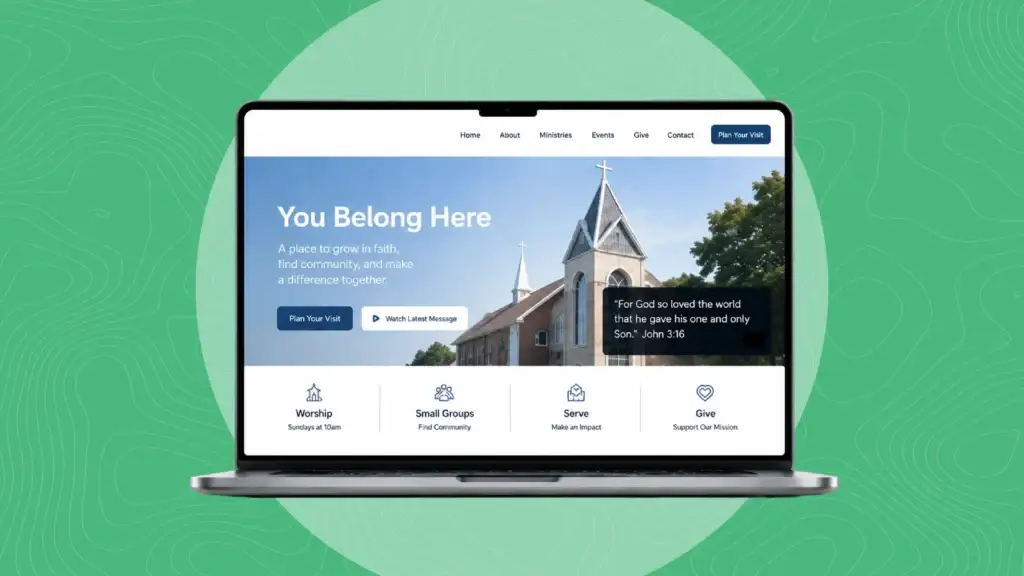
A church website is often someone’s first visit before their first visit. If it is clear, welcoming, and accessible, people can quickly find service times, watch a sermon, plan a visit with kids, and take a next step with confidence.
This guide walks through what to include, how to design for people of all abilities, realistic timelines and budgets, and how to keep the site updated without straining staff or volunteers.
If you want help, Dogwood bundles nonprofit marketing, website development, hosting, and content services for churches, with options for team training or fully managed support.
Start with a Welcoming Plan
Before layouts and plugins, define who you are serving and what they need at a glance. Most church visitors look for service times, location and parking, kids and student details, recent sermons, and how to connect.
- Clarify goals. Prioritize Sunday visit info, watching online, giving, and next steps.
- Map the journey. Build clear paths for new guests, members, and online attendees.
- Choose one primary action per page. Reduce friction and choice overload.
A short discovery phase aligned to your ministry calendar will keep the site useful year-round.
Must-Have Pages and Features
Every church is unique, but most should include:
- Homepage with service times, location, a simple plan-your-visit, and one primary call to action.
- About and beliefs with pastor introductions, doctrine summary, and photos that reflect your community.
- Sermons archive with filters by series, topic, speaker, scripture, plus audio, video, and transcripts or notes.
- Events calendar with recurring gatherings, registrations, and add-to-calendar links.
- Ministries, including kids, students, groups, and local missions, with safety guidelines and volunteer steps.
- A secure, mobile-friendly give page that clearly explains how gifts support the mission.
- Plan your visit with parking, entrances, check-in for kids, special accommodations, and what to expect.
- Contact and prayer request forms with clear response expectations and staff directory.
- Livestream hub that links to live services, on-demand replays, and caption options.
Build navigation that uses plain language, keeps the top menu short, and includes a sticky header so next steps are always in reach.
Accessibility That Welcomes Every Neighbor
Church websites should be built to meet the Web Content Accessibility Guidelines (WCAG 2.2) so everyone can engage. In the United States, many churches treat accessibility as a moral and practical imperative. Some churches and faith-based nonprofits may also be subject to the Americans with Disabilities Act (ADA) in certain contexts. While legal requirements can vary by organization type and jurisdiction, aiming for WCAG 2.2 AA is a smart baseline.
Key practices:
- Color and contrast. Ensure readable contrast and avoid conveying meaning by color alone.
- Keyboard use. All menus, forms, and media controls should work by keyboard with a visible focus state.
- Text alternatives. Add descriptive alt text to images and meaningful labels to buttons and links.
- Headings and structure. Use H1 through H3 in logical order, so screen readers can navigate.
- Forms. Provide clear labels, helpful error messages, and instructions before submission.
- Media. Provide captions for livestreams and recorded sermons; offer transcripts or sermon notes. Auto-captions are a start, but human-edited captions improve accuracy.
- Documents. Convert or remediate PDFs to be tagged and readable, or move the content to accessible web pages when possible.
Accessibility is ongoing. Add an accessibility statement and a contact method for feedback, then review new content with the same standards you used at launch. For a deeper dive, see our perspective on creating an ADA-compliant website design approach that aligns to WCAG 2.2.
Content That Serves Visitors and Search
Clear, human-centered copy helps real people and supports search engines. Lead with what people are trying to do.
- Put service times and address above the fold.
- Write short paragraphs, use subheads, and keep page titles descriptive.
- Add structured sermon metadata, image alt text, and internal links that help users, not bots.
- Keep events, ministries, and announcements current; stale pages create doubt.
If you need help building a consistent plan, Dogwood’s content marketing services can create, edit, and organize weekly updates so your team can focus on ministry.
Platform, Hosting, and Ongoing Care
Most churches benefit from WordPress because it is flexible, scalable, and easy to update after launch. Pair it with secure, managed hosting that handles updates, backups, and performance monitoring so your staff does not have to.
Dogwood provides secure WordPress hosting with Google Cloud-based infrastructure, routine updates handled by people, weekly scans, and monthly reporting. Training is available if you want to manage content in-house. Or choose a fully managed model, and we will handle seasonal pages, events, and sermon posting for you.
If you are planning a new site or a redesign, explore our custom website development approach built around clear navigation, mobile performance, and SEO-friendly structure.
Timelines and Budgets You Can Plan Around
Every church is different, but these ranges help with budgeting:
- Timeline. A typical church website takes about 6 to 12 weeks from kickoff to launch. Small refreshes can be faster; large, content-heavy sites can take longer, especially if approvals require committee steps.
- Cost. A simple church website often starts in the low thousands, while more complex builds with custom functionality, integrations, and migration support land higher. Costs vary by scope, content readiness, branding needs, and accessibility work like captioning and PDF remediation.
Ask prospective partners for a discovery call, a clear scope, milestones, and what is included after launch.
Build It Once, Steward It Well
A strong launch matters, but steady care keeps trust. Assign an owner or partner for:
- Weekly sermon posting with titles, series artwork, notes, and captions or transcripts.
- Monthly events and ministry updates.
- Quarterly accessibility and speed checks.
- Annual content audit to prune, refresh, and reorganize.
Dogwood offers nonprofit website design, hosting, content, SEO, social, and digital advertising in bundles sized for churches. Choose training for your volunteers, or let our team manage updates for you.
If you want broader outreach, discuss search visibility and community engagement with our SEO services or targeted outreach using digital advertising services when you promote special events and holidays.
Quick FAQ
- How do you design a website for a church? Start with visitor needs, define clear journeys for guests and members, keep navigation simple, and build accessible templates with readable contrast, keyboard access, and alt text. Prioritize service times, sermons, events, and giving.
- What should be on a church website? A welcoming homepage, beliefs and staff, sermons archive, events calendar, kids and students pages, plan-your-visit, giving, contact and prayer form, and a livestream hub with captions.
- Do church websites have to be ADA compliant? Legal specifics can vary. Many churches adopt WCAG 2.2 AA as a standard to welcome everyone and reduce risk. Provide captions, transcripts, or notes for sermons, accessible PDFs, and strong color contrast.
- What is the average cost of a church website? Budgets vary widely by scope. Expect the low thousands for a simple site and more for custom features, integrations, and comprehensive content or accessibility work.
- How many hours to build a website? It depends on size and content readiness. Typical church sites span several dozen to a few hundred hours across discovery, design, development, content, accessibility, testing, and training, usually over 6 to 12 weeks.
A Partner Built for Churches
Dogwood is a nonprofit marketing agency and a full-service marketing agency that understands church rhythms. We design and build church website design projects on WordPress, provide secure WordPress hosting, handle content and SEO, and train your team or manage it for you. Learn how our website design and development approach and content marketing services fit together, then experience the difference firsthand.
Next step: start a conversation about your goals and timeline. We will outline a right-sized plan and help you welcome more people online and on Sunday.